ویدیو
Mars Trips
رایگان
دستهبندی
- نمایش پرامپت رایگان — متن کامل پرامپت همین حالا و بدون خرید باز میشود.
- این سایت رو میخوام — همان آیتم بهصورت یک سایت آمادهٔ انتشار، طراحی و راهاندازیشده. قیمت: تومان 5.000.000
Mars Trips
MS-TEM-515متن زیر را کامل کپی کنید و در نسخهٔ Pro ابزارهای Claude Code یا GPT Codex بچسبانید تا همان صفحه ساخته شود. بدون اشتراک Pro این ابزارها، پرامپت کامل اجرا نمیشود.
# Redline — Mars Trips Three-Step 3D Hero (exact recreation prompt)

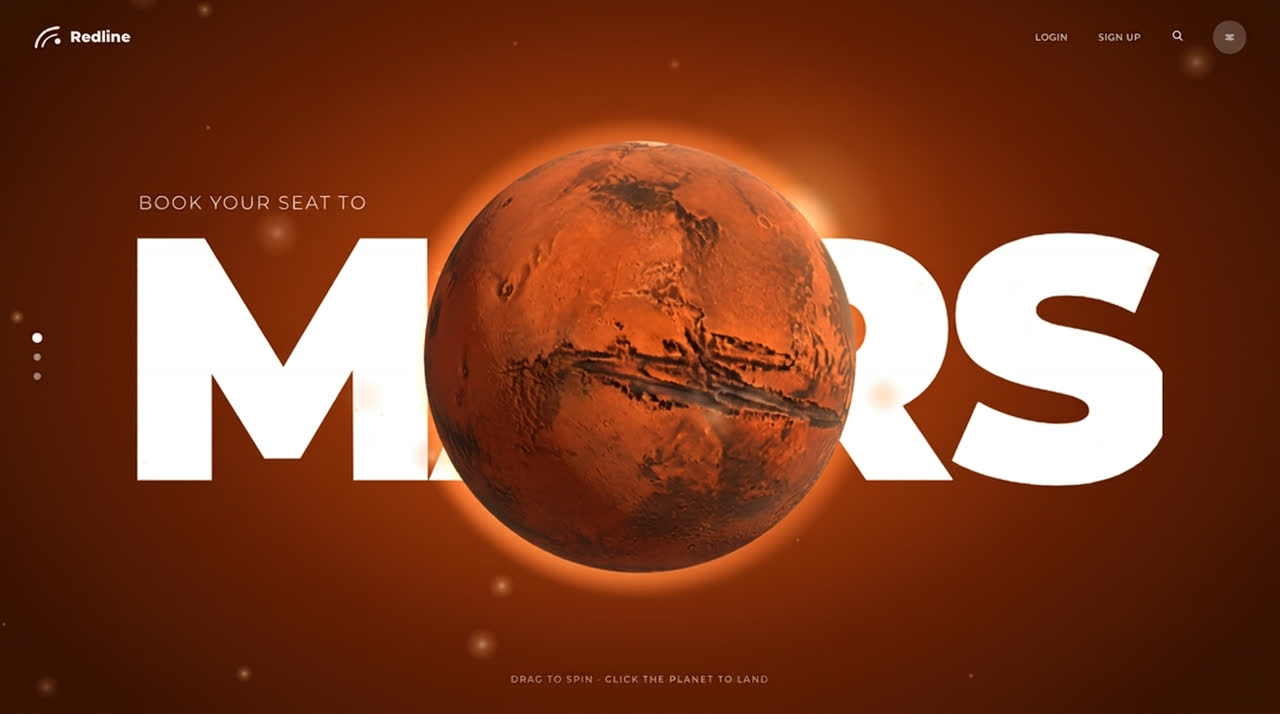
Build a single-file, full-viewport landing hero for **Redline**, a space-travel brand selling seats to Mars. It is one continuous three-step experience with no page loads:

1. **MARS:** a real 3D Mars swells from a speck in front of a giant white word, on a burnt-orange background.
2. **THARSIS:** the planet slides left and turns, a region lights up crimson like a territory on a map, and a timeline of landing sites appears on the right with a hover photo card.
3. **Landing:** the camera dives into the planet, whites out in a dust cloud, and a photoreal Mars canyon rises up, with the site name sitting between the background and foreground rock spires, plus a white booking bar.

Plain HTML, CSS and vanilla JS in one file, with Three.js r170 from an import map: `{ "imports": { "three": "https://cdn.jsdelivr.net/npm/three@0.170.0/build/three.module.js" } }`. Every moving value is computed each frame in one `render(now)` function from a single state float `st`. Reproduce every value, string, URL and timing below exactly.

---

## 1. Assets (use exactly these URLs)

```js
const P = 'https://images.higgs.ai/?default=1&output=webp&url=https%3A%2F%2Fd8j0ntlcm91z4.cloudfront.net%2Fuser_38xzZboKViGWJOttwIXH07lWA1P%2Fhf_';
const MAP = P + '20261031_030432_a1948696-c1d5-4468-845e-7d1291f80943.png&w=2688&q=92';
const LAND = P + '20261031_030420_da39d0cf-af67-4e33-a487-6469549cfbff.png&w=2400&q=88';
const FORE = P + '20261031_030420_fe406b69-3e6f-4b7c-a17e-ef09db0d270b.png&w=2400&q=88';
const CARDS = P + '20261031_030420_e222aa05-c121-4f31-a466-0321badc0e28.png&w=1400&q=85';
```
Full URLs:
- Mars colour map (2688×1152 flat map, wrapped on the sphere): `https://images.higgs.ai/?default=1&output=webp&url=https%3A%2F%2Fd8j0ntlcm91z4.cloudfront.net%2Fuser_38xzZboKViGWJOttwIXH07lWA1P%2Fhf_20261031_030432_a1948696-c1d5-4468-845e-7d1291f80943.png&w=2688&q=92`
- Canyon landscape (2688×1520): `https://images.higgs.ai/?default=1&output=webp&url=https%3A%2F%2Fd8j0ntlcm91z4.cloudfront.net%2Fuser_38xzZboKViGWJOttwIXH07lWA1P%2Fhf_20261031_030420_da39d0cf-af67-4e33-a487-6469549cfbff.png&w=2400&q=88`
- Foreground rock spires, transparent (2688×1520): `https://images.higgs.ai/?default=1&output=webp&url=https%3A%2F%2Fd8j0ntlcm91z4.cloudfront.net%2Fuser_38xzZboKViGWJOttwIXH07lWA1P%2Fhf_20261031_030420_fe406b69-3e6f-4b7c-a17e-ef09db0d270b.png&w=2400&q=88`
- Site photo sheet (2336×1744, four photos): `https://images.higgs.ai/?default=1&output=webp&url=https%3A%2F%2Fd8j0ntlcm91z4.cloudfront.net%2Fuser_38xzZboKViGWJOttwIXH07lWA1P%2Fhf_20261031_030420_e222aa05-c121-4f31-a466-0321badc0e28.png&w=1400&q=85`

The map must load with `crossOrigin='anonymous'`. The generated map is not seamless, so fix it on load in a 2688×1344 canvas:
- Copy the left 7% of the width onto a temp canvas, mask it with `destination-in` and a horizontal gradient from transparent (left) to opaque (right), then draw it at `x = W - fw`.
- Draw vertical gradients over the top and bottom 3.5% of the height from `#e9dfd2` to transparent, so the poles pinch cleanly.
- Use as `CanvasTexture`, `colorSpace = NoColorSpace`, `wrapS = RepeatWrapping`, max anisotropy.

Site card crops use `background-size:(2336/w·100)% (1744/h·100)%` and `background-position:(x/(2336−w)·100)% (y/(1744−h)·100)%`.

Font, exactly: `https://fonts.googleapis.com/css2?family=Montserrat:wght@300;400;500;600;800;900&display=swap`

## 2. CSS (use verbatim)

```css
:root{--red:#e8283c;--deep:#2a0d04}
*{box-sizing:border-box;margin:0;padding:0}
html,body{height:100%;overflow:hidden;background:var(--deep);color:#fff;font-family:Montserrat,system-ui,sans-serif;-webkit-font-smoothing:antialiased}
a{color:inherit;text-decoration:none}button{font:inherit;color:inherit;background:none;border:0;cursor:pointer}
.hero{position:fixed;inset:0;overflow:hidden;background:radial-gradient(58% 72% at 50% 47%,#d0591f 0%,#a23f12 32%,#6b2409 62%,#3b1405 100%)}
.hero>*{position:absolute}

#word0{left:50%;top:50%;font-weight:900;font-size:min(27vw,50vh);line-height:.8;letter-spacing:-.035em;white-space:nowrap;z-index:2;will-change:transform,clip-path}
#eyebrow{left:50%;top:50%;z-index:3;font-weight:300;font-size:clamp(14px,1.45vw,23px);letter-spacing:.1em;text-transform:uppercase;white-space:nowrap}
#gl{inset:0;width:100%;height:100%;z-index:4;cursor:grab;touch-action:none}
#gl.drag{cursor:grabbing}
#dust{inset:0;width:100%;height:100%;z-index:5;pointer-events:none}
#flare{z-index:1;width:44vmin;height:44vmin;margin:-22vmin;border-radius:50%;pointer-events:none;background:radial-gradient(closest-side,rgba(255,236,205,.95),rgba(255,176,96,.42) 26%,rgba(255,140,60,.1) 58%,transparent)}

#pin{z-index:6;left:0;top:0;display:flex;align-items:center;gap:9px;font-weight:600;font-size:11px;letter-spacing:.16em;text-transform:uppercase;pointer-events:none;white-space:nowrap}
#pin i{width:12px;height:12px;border-radius:50%;background:#fff;position:relative;box-shadow:0 0 0 4px rgba(232,40,60,.75)}
#pin i::after{content:"";position:absolute;inset:-13px;border-radius:50%;border:1px solid #fff;animation:pulse 2s ease-out infinite}
@keyframes pulse{from{transform:scale(.4);opacity:1}to{transform:scale(1.4);opacity:0}}

#word1{left:50%;top:0;z-index:6;font-weight:800;font-size:min(9.4vw,19vh);letter-spacing:-.02em;line-height:1;color:rgba(255,255,255,.74);pointer-events:none;white-space:nowrap}

#sites{right:6.2%;top:50%;z-index:7;list-style:none;display:grid;gap:clamp(30px,6.6vh,62px);transform:translateY(-50%)}
#sites::before{content:"";position:absolute;right:5px;top:6px;bottom:6px;width:1px;background:rgba(255,255,255,.5)}
#sites li{position:relative;text-align:right;padding-right:30px;cursor:pointer;font-weight:500;font-size:11.5px;letter-spacing:.07em;text-transform:uppercase;transition:font-size .3s}
#sites li::after{content:"";position:absolute;right:1px;top:50%;width:9px;height:9px;margin-top:-5px;border-radius:50%;background:#fff;transition:transform .3s,box-shadow .3s}
#sites li.on{font-size:15px}
#sites li.on::after{transform:scale(1.5);box-shadow:0 0 0 7px rgba(255,255,255,.28)}
#card{right:calc(6.2% + 196px);top:0;z-index:7;width:clamp(170px,15.5vw,250px);aspect-ratio:1.42;background-repeat:no-repeat;border-radius:3px;box-shadow:0 22px 44px rgba(20,4,0,.45);overflow:visible}
#card a{position:absolute;left:-26px;bottom:18%;background:var(--red);font-weight:600;font-size:10.5px;letter-spacing:.09em;text-transform:uppercase;padding:9px 15px;border-radius:2px;box-shadow:0 8px 18px rgba(120,10,20,.45)}

#region{left:50%;top:50%;z-index:7;transform:translate(-50%,-50%);font-weight:500;font-size:clamp(26px,3.4vw,54px);letter-spacing:.04em;pointer-events:none}

#land,#fore{inset:0;background-size:cover;background-repeat:no-repeat}
#land{z-index:8;background-position:50% 60%;will-change:transform}
#dest{left:0;right:0;top:0;z-index:9;text-align:center;pointer-events:none}
#dest small{display:block;font-weight:300;font-size:min(5.2vw,11vh);line-height:1;letter-spacing:.04em;text-transform:uppercase;opacity:.92}
#dest b{display:block;margin-top:.04em;font-weight:900;font-size:min(9.2vw,19vh);line-height:1;letter-spacing:-.03em;text-transform:uppercase;white-space:nowrap;color:#fff4e6}
#fore{z-index:10;background-position:50% 100%;will-change:transform}
#fog{inset:0;z-index:11;pointer-events:none;background:radial-gradient(70% 64% at 50% 46%,#fbe6cd 0%,#f6d3ae 52%,#b36a37 100%)}

#scrim{left:0;right:0;top:0;height:150px;z-index:13;pointer-events:none;background:linear-gradient(rgba(44,14,3,.62),rgba(44,14,3,0))}
#bar{left:50%;bottom:7.5vh;z-index:12;width:min(86vw,920px);display:grid;grid-template-columns:1fr 1fr 1fr 68px;background:#fff;color:#2b1a12;border-radius:3px;box-shadow:0 24px 60px rgba(30,6,0,.5)}
#bar div{padding:15px 22px;border-right:1px solid #eadfd6}
#bar label{display:block;font-weight:500;font-size:10px;letter-spacing:.09em;text-transform:uppercase;color:#9a877b}
#bar input{width:100%;margin-top:5px;border:0;outline:0;font:600 15px Montserrat,sans-serif;color:#2b1a12;background:none}
#bar button{background:var(--red);color:#fff;border-radius:0 3px 3px 0;font-size:22px;transition:background .25s}
#bar button:hover{background:#c41426}

/* chrome */
header{left:0;right:0;top:0;z-index:20;display:flex;align-items:center;padding:clamp(18px,3.2vh,30px) clamp(20px,2.6vw,42px);font-size:11.5px;font-weight:500;letter-spacing:.05em;text-transform:uppercase;pointer-events:none}
header>*{pointer-events:auto}
.logo{display:flex;align-items:center;gap:12px;margin-right:auto;font-weight:800;font-size:19px;letter-spacing:-.01em;text-transform:none}
.logo svg{width:34px;height:30px}
header a{margin-left:clamp(16px,2.6vw,38px);opacity:.92;transition:opacity .2s}
header a:hover{opacity:1}
.ico{width:42px;height:42px;margin-left:clamp(14px,2.4vw,36px);border-radius:50%;display:grid;place-items:center;background:rgba(255,255,255,.2);transition:background .25s}
.ico:hover{background:rgba(255,255,255,.34)}
.ico svg,.srch svg{width:16px;height:16px;fill:none;stroke:#fff;stroke-width:2;stroke-linecap:round}
.srch{margin-left:clamp(16px,2.6vw,38px)}
#rail{left:clamp(20px,2.6vw,42px);top:50%;z-index:20;display:grid;gap:15px;transform:translateY(-50%)}
#rail button{width:9px;height:9px;border-radius:50%;background:rgba(255,255,255,.45);transition:background .3s,transform .3s}
#rail button.on{background:#fff;transform:scale(1.35)}
#hint{left:50%;bottom:4.4vh;transform:translateX(-50%);z-index:7;font-weight:400;font-size:11px;letter-spacing:.17em;text-transform:uppercase;opacity:.8;white-space:nowrap}

@media (max-width:760px){
  header a{display:none}
  #word0{font-size:29vw}
  #eyebrow{font-size:12px}
  #word1{font-size:15vw}
  #sites{right:18px;top:auto;bottom:11vh;transform:none;gap:22px}
  #card{right:auto;left:18px;top:auto!important;bottom:11vh;width:42vw}
  #card a{left:8px;bottom:8px}
  #dest b{font-size:11vw}#dest small{font-size:7vw}
  #bar{grid-template-columns:1fr 1fr;width:calc(100vw - 32px);bottom:4vh}
  #bar div:nth-child(2){border-right:0}
  #bar div{padding:11px 14px;border-bottom:1px solid #eadfd6}
  #bar button{height:46px;border-radius:0 0 3px 0}
  #hint,#rail{display:none}
  #fore{background-size:210% auto}
}
```

## 3. Markup (DOM order inside `main.hero#hero`)

```html
<div id="word0">MARS</div>
<div id="eyebrow">Book your seat to</div>
<div id="flare"></div>
<canvas id="gl"></canvas>
<canvas id="dust"></canvas>
<div id="pin"><i></i><span>Tharsis</span></div>
<div id="word1">THARSIS</div>
<ul id="sites"></ul>
<div id="card"><a href="#" id="explore">Explore</a></div>
<div id="region">THARSIS</div>
<div id="land"></div>
<div id="dest"><small>Tharsis</small><b id="destName">Olympus Mons</b></div>
<div id="fore"></div>
<div id="fog"></div>
<div id="scrim"></div>
<form id="bar" onsubmit="return false">
  <div><label for="d1">Depart Earth</label><input id="d1" value="12 Mar 2041"></div>
  <div><label for="d2">Return</label><input id="d2" value="30 Sep 2042"></div>
  <div><label for="d3">Passengers</label><input id="d3" value="2 adults"></div>
  <button aria-label="Search seats">→</button>
</form>
<header>
  <a class="logo" href="#" id="home" style="margin-left:0;opacity:1"><svg viewBox="0 0 34 30" fill="none" stroke="#fff" stroke-linecap="round"><path stroke-width="3.2" d="M3 27C5 13 15 4 31 3"/><path stroke-width="2" d="M11 27c1.500-8 8-14 18-15"/><circle cx="30" cy="20" r="3.500" fill="#fff" stroke="none"/></svg>Redline</a>
  <a href="#">Login</a><a href="#">Sign up</a>
  <span class="srch"><svg viewBox="0 0 24 24"><circle cx="10.500" cy="10.500" r="6.500"/><path d="m15.500 15.500 5 5"/></svg></span>
  <button class="ico" aria-label="Menu"><svg viewBox="0 0 24 24"><path d="M5 8h14M7 12h10M5 16h14"/></svg></button>
</header>
<div id="rail"><button aria-label="Mars"></button><button aria-label="Tharsis"></button><button aria-label="Destination"></button></div>
<div id="hint">Drag to spin · click the planet to land</div>
```

## 4. Data

```js
const SHEET = {w: 2336, h: 1744};
// map position u,v (0..1 from top-left), card crop x,y,w,h on the 2336x1744 sheet
const SITES = [
  {name: 'Olympus Mons', u: .121, v: .31, box: [0, 0, 1150, 810]},
  {name: 'Valles Marineris', u: .45, v: .56, box: [1186, 0, 1150, 810]},
  {name: 'Gale Crater', u: .85, v: .75, box: [0, 900, 1150, 810]},
  {name: 'Jezero Delta', u: .61, v: .35, box: [1186, 900, 1150, 810]}
];
const THARSIS = {u: .15, v: .41};
```
Direction of a map point (matches `SphereGeometry` uv): `ph = 2π·u`, `th = π·v`, `dir = (-cos ph·sin th, cos th, sin ph·sin th)`. To face a point at the camera: `faceYaw = atan2(-d.x, d.z)`, `faceLat = asin(d.y)`.

`#sites` renders `<li data-i>` per site. `pick(i)`: set `.on` on that item, set the card crop, move the card vertically so its centre aligns with the item (`rect.top + rect.height/2 - card.offsetHeight/2`), and set `#destName`. Hover calls `pick(i)`. Clicking an item calls `pick(i); go(2)`. `#explore` calls `go(2)`, `#home` calls `go(0)`, rail dots call `go(i)`.

## 5. Three.js scene

`WebGLRenderer({canvas,alpha:true,antialias:true})`, pixel ratio `min(dpr,2)`. **OrthographicCamera** in CSS pixels (`left=-W/2 … top=H/2`, near −2e5, far 2e5), so the planet can grow arbitrarily large. Hierarchy `planet` (position in px, scale = radius) > `tilt` (rotation.x = pitch) > `spin` (rotation.y = yaw) > mesh.

`planet.position = (cx - W/2, H/2 - cy, 0)`.

Sphere: `SphereGeometry(1,128,96)` with this ShaderMaterial. Uniforms: `map`, `ready`, `texel=(1/2688,1/1344)`, `sun=normalize(.62,.5,.6)`, `hiDir`, `hi`, `hiR`.

```glsl
// vertex
  varying vec2 vUv; varying vec3 vObj; varying vec3 vN;
  void main(){ vUv = uv; vObj = normalize(position); vN = normalize(mat3(modelMatrix) * normal);
    gl_Position = projectionMatrix * modelViewMatrix * vec4(position, 1.); }
// fragment
    uniform sampler2D map; uniform vec2 texel; uniform vec3 sun, hiDir; uniform float hi, hiR, ready;
    varying vec2 vUv; varying vec3 vObj; varying vec3 vN;
    float luma(vec2 u){ return dot(texture2D(map, u).rgb, vec3(.3,.6,.1)); }
    void main(){
      vec3 col = texture2D(map, vUv).rgb; col = pow(col, vec3(2.6)) * vec3(1.18,.74,.56);
      // relief from the map's own brightness
      vec3 n = normalize(vN);
      vec3 t = normalize(cross(vec3(0.,1.,0.), n)), b = cross(n, t);
      float dx = luma(vUv + vec2(texel.x*2.,0.)) - luma(vUv - vec2(texel.x*2.,0.));
      float dy = luma(vUv + vec2(0.,texel.y*2.)) - luma(vUv - vec2(0.,texel.y*2.));
      n = normalize(n - (t*dx + b*dy) * 1.9);
      float diff = max(dot(n, sun), 0.);
      vec3 lit = col * (vec3(1.5,1.32,1.18) * pow(diff, .85) + vec3(.2,.09,.06));
      // highlighted region with a rough edge, like a territory on a map
      float d = acos(clamp(dot(normalize(vObj), hiDir), -1., 1.)) + (luma(vUv) - .45) * .22;
      float m = smoothstep(hiR, hiR - .03, d), edge = smoothstep(.03, .0, abs(d - hiR + .01));
      lit = mix(lit, mix(lit, vec3(.62,.012,.07) * (.25 + diff * 1.05) * (.5 + luma(vUv) * 1.1), .9), m * hi) + vec3(1.,.42,.4) * edge * hi * .22;
      float fres = pow(1. - max(vN.z, 0.), 3.2);
      lit += vec3(1.,.5,.26) * fres * (.05 + diff * .5);
      lit = lit / (lit * .3 + 1.) * 1.3;
      gl_FragColor = vec4(pow(lit, vec3(1./2.2)), 1.) * ready;
    }
```

Atmosphere: `SphereGeometry(1.14,64,48)` added to `planet` (not spun), `BackSide`, additive, transparent, no depth write:

```glsl
// vertex
varying vec3 vN; void main(){ vN = normalize(mat3(modelMatrix)*normal); gl_Position = projectionMatrix*modelViewMatrix*vec4(position,1.); }
// fragment
uniform vec3 sun; uniform float ready; varying vec3 vN;
    void main(){ float z = clamp(-vN.z, 0., 1.), a = smoothstep(.0, .55, z);
      float s = .55 + .6 * max(dot(-vN * vec3(1.,1.,0.), normalize(sun * vec3(1.,1.,0.))), 0.);
      a = pow(a, 2.6) * s * .7; gl_FragColor = vec4(vec3(1.,.64,.36), a * ready); }
```

## 6. Layout

`R0 = portrait ? W*.36 : min(H*.3, W*.19)`, with `portrait = H > W*1.05`.

## 7. State flow

`st` runs 0..2. `go(n)`: ignore if `n === to`; `from = st; to = n; t0 = now`. Duration is the sum of the spans crossed: 1300ms for 0↔1, 2500ms for 1↔2 (1ms when reduced motion). `st = mix(from,to,io(seg(now,t0,t0+dur)))`, with `a = clamp(st)` and `b = clamp(st-1)`.

Triggers: wheel `deltaY` beyond ±8 steps `to` ±1 (locked 1400ms); Escape steps back; clicking the planet (pointer moved <6px, inside the radius, `to<2`) advances.

Helpers: `seg(p,a,b)=clamp((p-a)/(b-a))`; `io(k)=k<.5?4k³:1-(-2k+2)³/2`; `out(k)=1-(1-k)³`.

Per frame:

**Intro** (`age` = seconds since the map loaded): `grow = out(seg(age,0,1.5))`, `iw = out(seg(age,.75,1.7))`.

**Planet:** `bz = io(seg(b,0,.62))`.
- `px = portrait ? .5W : mix(.5W,.36W,a)`
- `py = portrait ? mix(.4H,.33H,a) : .5H`
- `R = R0 * mix(.03,1,grow) * (1+a*.04) * exp(bz*2.5)`
- `cx = mix(px,.5W,bz)`, `cy = mix(py,.5H,bz)`

**Rotation:** start `yaw = faceYaw(dir(u .4, v .5))`, `pitch = .16`. Auto-spin at `st<.02`, no drag, 1.5s after the last drag: `yaw += dt*(.08+(1-grow)*2.4)`. Drag: `k = 1.1/R0`, `yaw += dx*k`, `pitch = clamp(pitch+dy*k,-1,1)`; inertia `yaw += vy; vy *= exp(-dt*4)`. When `st>.02`, steer to the target (Tharsis, or the site once `b>0`): shortest-arc yaw ease at rate 3.6, `pitch` to `faceLat` at rate 3.6. Back at rest, `pitch` returns to .16 at rate 1.2. Ease factor `f(r)=1-exp(-dt*r)`, `dt` capped at .05.

**Highlight:** `hiDir` = site when `b>.02`, else Tharsis. `hiR = b>.02 ? mix(.62,.3,seg(b,0,.1)) : .62`. `hi = clamp(seg(a,.15,.6)+(b>0?1:0))`.

**word0:** translate `-50%` plus `-a·.08W` in x (0 in portrait); y `-50%` plus `mouseY*-6`, where `mouseY` is pointer y/H − .5. In portrait y offset is `H*-.1 + R*1.08 + wordHeight*.5`, so the word sits under the planet. `clip-path: inset(-10% I% -10% I%)` with `I=(1-iw)*50`, so it opens from the centre. Opacity `1-seg(a,.1,.5)`.

**eyebrow:** left-aligned to the word's left edge + 2% of word width, `wordHeight/2 + 34` above centre, moves with the word. In portrait centred below the word. Opacity `iw*(1-seg(a,.05,.35))`.

**flare:** at `(cx+R*.74, cy-R*.62)`, opacity `grow*(.88+.12 sin(t*1.3))*(1-seg(bz,0,.35))`.

**hint:** opacity `iw*.8*(1-seg(a,0,.25))`.

**pin:** projects Tharsis: `dir` rotated by spin then tilt. Screen position `(cx+x*R-6, cy-y*R-8)`. Opacity `seg(z,.22,.42)*seg(age,1.6,2.1)*(1-seg(a,0,.3))`.

**word1:** `ka=seg(a,.45,1)`, opacity `ka*(1-seg(b,.02,.16))`, x `-50%` plus `.02W+(1-out(ka))*40` (0 in portrait), y `.56H` (portrait `.46H`).

**sites + card:** opacity `seg(a,.55,1)*(1-seg(b,0,.14))`, hidden when ≈0, no pointer events under .6. Card translateX `(1-out(seg(a,.6,1)))*26`.

**#gl** takes pointer events only while `st<1.02`.

**region** (site name, uppercased, centred on the zoomed planet): opacity `seg(b,.14,.26)*(1-seg(b,.42,.52))`.

**fog:** `fi=seg(b,.36,.54)`, `fo=seg(b,.62,.96)`, opacity `fi*(1-fo)`.

**Landing layers** visible when `b>.5`. `lk=out(seg(b,.5,1))`, `fk=out(seg(b,.58,1))`, `dk=out(seg(b,.66,.98))`, `drift=1+.02 sin(t*.18)`, `mouseX` = pointer x/W − .5:
- land: `translate(mouseX*-14, mix(.2H, mouseY*-8, lk)) scale(mix(1.3,1.05,lk)*drift)`
- fore: `translate(mouseX*-46, mix(.42H,0,fk)) scale(1.06)`
- dest: `translate(mouseX*-26, mix(.62H, .27H, dk))` (portrait end `.3H`); its `small` opacity `seg(b,.8,1)*.92`

**bar:** `bk=seg(b,.86,1)`, opacity bk, `translate(-50%,(1-out(bk))*34px)`.

**scrim:** opacity `seg(b,.6,.9)`, so the nav stays legible over the bright sky.

**rail:** `.on` on the dot at `round(st)`.

## 8. Dust

`#dust` is a 2D canvas (pixel ratio `min(dpr,1.5)`). Pre-render a 64px radial sprite: `rgba(255,214,170,.95)` → `rgba(255,180,120,.42)` at .4 → transparent. 34 motes with seeded random `x,y∈0..1`, `r=3+rnd²*34`, `s=.004+rnd*.012`, `p=rnd*6.28`. Each frame: `x=((m.x+t*m.s+2)%1.1-.05)*W`, `y=(m.y+sin(t*.3+m.p)*.02)*H`, alpha `.3+.35*sin(t*.7+m.p)²` (×.7 on the landing).

## 9. Feel

A premium travel site that happens to sell another planet. Heavy white type, one vivid planet with real weight in the hand, and a single unbroken camera move from orbit to the ground. Keep it all warm rust and orange, with crimson for the region and the call to action.شرایط و تحویل
دانلوددسترسی فوری پس از پرداخت
مالکیتاستفادهٔ تجاری مادامالعمر
آپدیتبهروزرسانیهای کتابخانه رایگان
پشتیبانیراهنمای نصب و پاسخ به سؤالات
امتیاز و نظرها
0.0/5
0 نظر ثبتشده
نظرتان را بنویسید
تجربهتان از این آیتم را با دیگر مشتریان به اشتراک بگذارید.