ویدیو
Atlas Lab Features
رایگان
دستهبندی
- نمایش پرامپت رایگان — متن کامل پرامپت همین حالا و بدون خرید باز میشود.
- این سایت رو میخوام — همان آیتم بهصورت یک سایت آمادهٔ انتشار، طراحی و راهاندازیشده. قیمت: تومان 5.000.000
Atlas Lab Features
MS-SEC-155متن زیر را کامل کپی کنید و در نسخهٔ Pro ابزارهای Claude Code یا GPT Codex بچسبانید تا همان صفحه ساخته شود. بدون اشتراک Pro این ابزارها، پرامپت کامل اجرا نمیشود.
# Prompt: Atlas Cognition "Lab" features section

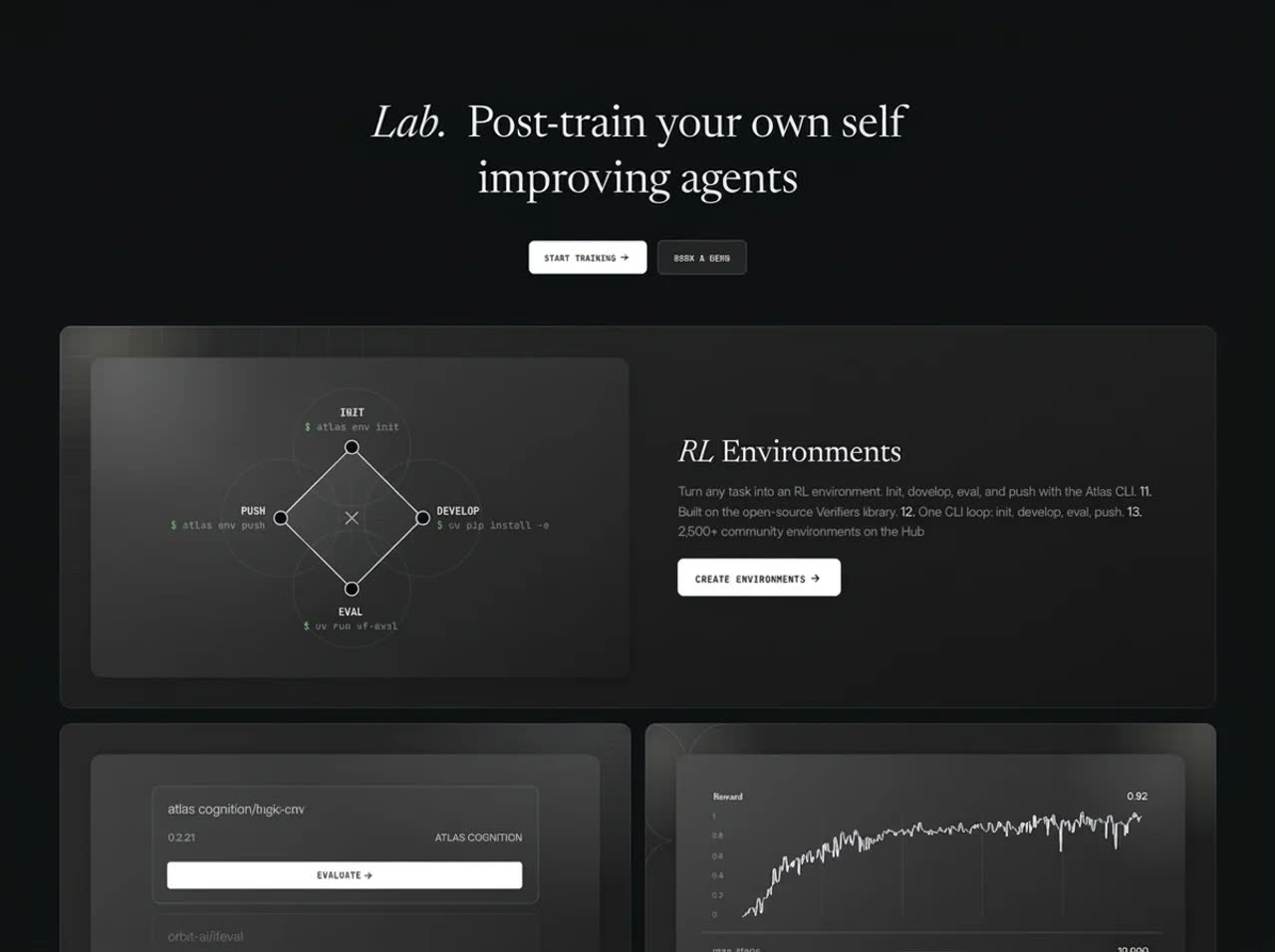
Build a single-file **product features section for a fictional AI research company, Atlas Cognition**. Use plain HTML, CSS, inline SVG and vanilla JS, with no framework and no build step. The look is a quiet near-black lab: a big serif headline, small mono labels, and a bento of four dark graphite cards. Each card has a softly lit inner panel with a technical line illustration. There are no photos; everything is CSS gradients and SVG.

## Scale

- **Units:** card internals are sized in reference pixels times `--c`, a container-query unit (`100cqw / <card reference width>`), so each card scales as one piece.
- **Desktop (container width ≥ 1164px):** a reworked bento.
  - Environments and Inference are full-width rows, each with the panel on one side and the copy on the other. The two rows are mirrored, so Environments has its panel on the left and Inference has its panel on the right.
  - Evaluations and Hosted Training sit side by side between them.
- **Narrower:** the cards stack in one column with the panel above the copy.

## Type and colour

- **Fonts:**
  - **Newsreader** ("News", 200–800): the headline and card titles, with "Lab." and "RL" in italic
  - **Inter** ("InterV"): body text
  - **JetBrains Mono** ("Mono"): labels, numbers and button text in small caps
- **Colours:**
  - page `#0F1112`
  - ink white
  - body text white at 58%
  - cards: graphite gradients from `#1B1D1E` to `#141617`, with a 1px white border at 6% and a soft top-left radial light

## Content

- **Headline:** "*Lab.* Post-train your own self / improving agents", centred.
- **Buttons:** two small mono buttons: a white "START TRAINING →" and a dark outlined "BOOK A DEMO".
- **Cards** (each has a title, a one-line description, three numbered points and a small mono button):
  1. ***RL* Environments:** "Turn any task into an RL environment. Init, develop, eval, and push with the Atlas CLI."
     - Points: 11. "Built on the open-source Verifiers library." 12. "One CLI loop: init, develop, eval, push." 13. "2,500+ community environments on the Hub".
     - Button: "CREATE ENVIRONMENTS →".
     - Panel: a diamond loop diagram (INIT, DEVELOP, EVAL, PUSH nodes with `$ atlas env …` captions) around a small × centre.
  2. **Evaluations:** "Hosted evaluations for you to benchmark the performance of your models."
     - Points: 21–23.
     - Button: "RUN YOUR FIRST EVAL".
     - Panel: a model picker reading "atlas-cognition/…", a white "EVALUATE →" bar and a faint results list.
  3. **Hosted Training:** "Train large-scale models optimized for agentic workflows."
     - Points: 31. "Train on 2,500+ RL environments." 32. "Managed training workflows with full visibility and control." 33. "Hands on support from our applied research team".
     - Panel: a jagged white reward curve rising left to right on a fine grid, with "Reward" and step labels.
  4. **Inference:** "Dedicated or serverless inference for your custom models, with native LoRA support."
     - Points: 41–43.
     - Button: "BOOK A CALL".
     - Panel: stacked deployment rows with a LoRA adapter tag.

## Motion

- **Entrance:** cards fade and rise once as they enter the viewport (IntersectionObserver plus Web Animations, a 90ms stagger). The headline words rise first.
- **Panels:** the inner panels have a slow drifting highlight (a radial gradient) and SVG strokes that draw in once.
- **Hover:**
  - Cards brighten their border.
  - Buttons swap to `#E9E9E9` (light) or `#2F2F2F` (dark).
- **Touch:** hover effects are off on touch screens (`hover: none`).
- **Reduced motion:** nothing animates.

## Acceptance check (1440×1080)

- The serif headline and two buttons are centred above a wide Environments card, with the panel on the left and the copy on the right.
- The Evaluations and Training cards sit below it, followed by a mirrored Inference row.
- **Content:** no real brands or logos.شرایط و تحویل
دانلوددسترسی فوری پس از پرداخت
مالکیتاستفادهٔ تجاری مادامالعمر
آپدیتبهروزرسانیهای کتابخانه رایگان
پشتیبانیراهنمای نصب و پاسخ به سؤالات
امتیاز و نظرها
0.0/5
0 نظر ثبتشده
نظرتان را بنویسید
تجربهتان از این آیتم را با دیگر مشتریان به اشتراک بگذارید.